
What is the best solar security camera for a remote site?
The best solar security camera for a remote site is the one that matches the location’s power, network, viewing distance, storage and maintenance conditions. A small farm entrance may need a compact solar Wi-Fi camera, while a large yard or construction site may need a 4G solar PTZ camera with optical zoom and human tracking.
Solar cameras are useful when installing mains power or Ethernet cable would be expensive, slow or impractical. They can support surveillance at farms, orchards, construction sites, parking areas, remote gates, storage yards, villas and other outdoor locations.
HIKWIFI’s solar product range includes solar Wi-Fi kits, solar PTZ cameras and 4G solar PTZ cameras. The right choice should be based on the site plan rather than on resolution alone.
When should you use a solar security camera?
A solar security camera is a practical option when the monitoring point is outdoors and does not have a convenient permanent power connection. It can reduce trenching and cabling work, but it still requires careful planning.
Common use cases include:
- Farm entrances, animal areas and orchard roads
- Construction sites without completed electrical infrastructure
- Remote storage yards and equipment areas
- Parking lots, gates and temporary access points
- Villas, estates and large residential properties
- Rural roads, field boundaries and utility areas
- Temporary project sites where the camera may later be relocated
Solar power does not mean that installation can be placed anywhere. The panel needs suitable sunlight, the camera needs a stable mounting point and the network connection must match the site conditions.
How do solar security cameras get power?
A solar camera normally combines a solar panel, a rechargeable battery and a low-power camera system. During the day, the panel charges the battery. The battery then powers the camera when sunlight is weak or unavailable.
The actual operating result depends on several factors:
- Available sunlight throughout the year
- Panel orientation and shading
- Battery capacity and battery condition
- Recording or wake-up schedule
- Night-vision and auxiliary-light use
- Frequency of live viewing and remote playback
- Local temperature and weather conditions
For example, HIKWIFI’s 3MP Solar WiFi Home Hub Camera Kit lists a built-in battery, a 3W solar panel, PIR detection, infrared and full-color night vision, local TF-card and cloud-storage options, and IP66 outdoor protection. These features make the kit suitable for planned outdoor monitoring where a hub and camera pairing approach is appropriate.
A solar camera should not be selected only by looking at the panel wattage. The panel, battery, camera sleep strategy, night lighting and expected activity level must be considered as one power system.
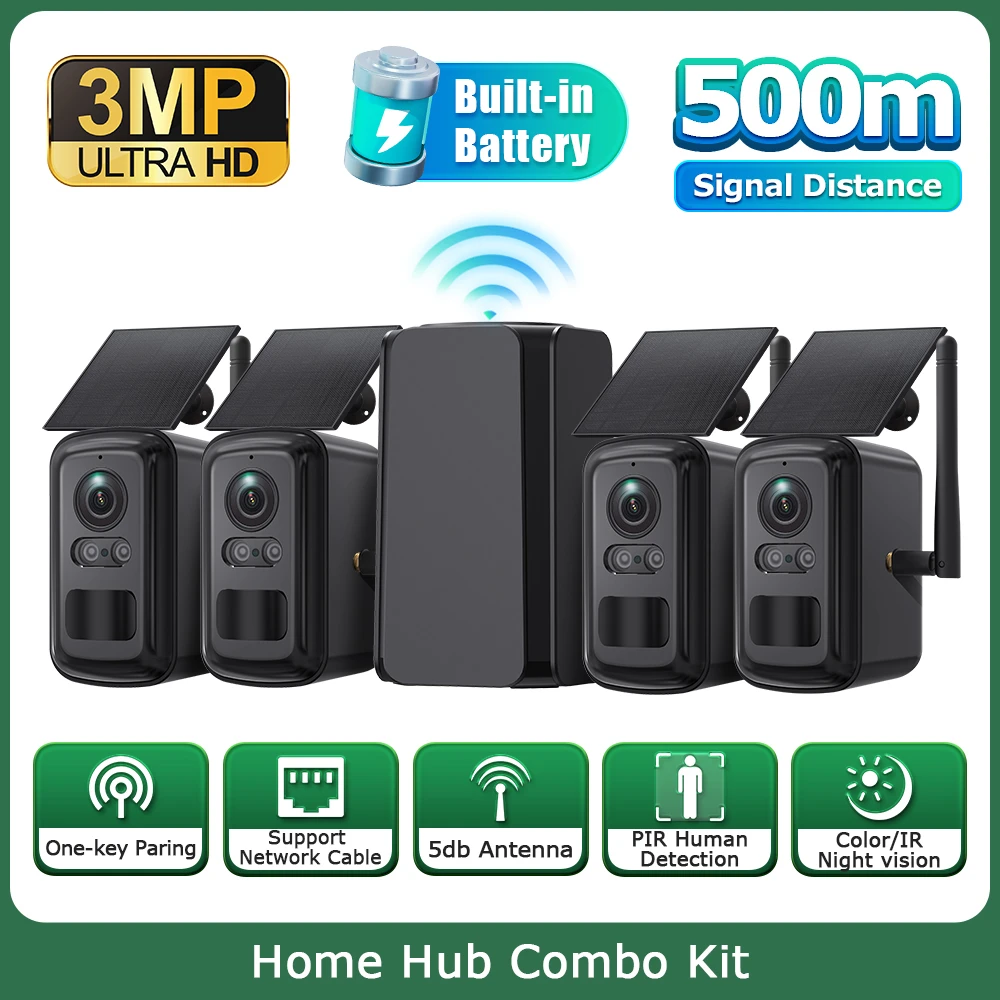
Figure 1. HIKWIFI 3MP Solar WiFi Home Hub Camera Kit with solar panels, built-in battery, hub and wireless camera units. Use this product image after the solar power section.
Should you choose a solar Wi-Fi camera or a 4G solar camera?
The main difference is how the camera reaches the internet or monitoring platform.
| Requirement | Solar Wi-Fi or Home Hub Kit | 4G Solar Camera or PTZ |
|---|---|---|
| Network condition | A usable Wi-Fi or hub connection is available | A suitable 4G mobile signal is available |
| Typical location | Farm, estate, orchard, villa or nearby outdoor area | Remote yard, gate, field or temporary site |
| Installation style | Camera paired with a hub or local wireless network | Camera connects through a SIM and cellular network |
| Main advantage | Shared hub connection and simple multi-camera planning | Does not require a local broadband connection |
| Main planning risk | Distance, walls, metal structures and wireless interference | Signal strength, data cost and SIM compatibility |
| Best for | Several nearby camera points with a planned wireless layout | Independent locations separated from the main network |
HIKWIFI’s 3MP Solar Camera Combo Kit with Repeater is described as a solar-powered Wi-Fi kit with a hub/repeater, PIR human detection, two-way audio, full-color night vision and long-distance wireless transmission in open conditions.
For an independent remote point, the 6MP 4G Solar PTZ Camera with 20X Zoom and Dual Lens is a different type of solution. Its product page lists 4G connectivity, Wi-Fi, a 6W solar panel, a 10050mAh battery, 20× zoom, dual-lens viewing, human detection and human tracking.
The decision is simple:
- Choose a solar Wi-Fi or Home Hub kit when the site has a stable local wireless plan and several cameras can work within that network design.
- Choose a 4G solar camera when the camera must operate independently and the location has suitable cellular coverage.
How much coverage do you need?
Before selecting the lens or PTZ function, define what the camera must show.
A remote gate may require a clear view of people and vehicles approaching the entrance. A farm road may need a wider overview. A construction site may need both a broad view and the ability to inspect a distant machine or material area.
Use this planning table:
| Monitoring task | Camera characteristic to consider |
|---|---|
| Observe one entrance or doorway | Fixed view with a suitable lens angle |
| Cover a wide yard | Wide-angle or PTZ camera |
| Inspect distant equipment | Optical zoom and stable mounting |
| Follow people moving through an area | Human detection or human tracking |
| Monitor several nearby points | Hub-based kit or multiple cameras |
| Check a remote gate | 4G connection, motion alerts and night vision |
| Review activity after an event | Local TF-card, cloud or other storage option |
HIKWIFI’s 16MP Solar PTZ Camera page lists outdoor use, PTZ-style viewing, motion-related functions, two-way audio and SD-card/cloud storage options. The exact field of view and operating result should still be confirmed from the final model documentation.
Do you need a PTZ solar camera?
A PTZ camera is useful when operators need to change the viewing direction or inspect different areas remotely. It can be more flexible than a fixed camera, but it also requires a clear understanding of how the site will be monitored.
Choose a solar PTZ camera when:
- The area is too wide for one fixed viewing angle
- Operators need to inspect different preset positions
- A distant object may need closer visual checking
- The site has a central position from which several directions can be covered
- Human tracking or patrol functions are relevant to the application
A PTZ camera is not always the best choice for evidence at a narrow entrance. A fixed camera may provide a more consistent view of a specific access point. For larger locations, a practical design may combine fixed cameras for important points with a PTZ camera for general-area inspection.
The HIKWIFI 4G solar PTZ product page lists a 20× zoom lens, 350° horizontal rotation, 90° vertical movement, preset points, patrol functions and human tracking. These functions should be matched to the actual site map and not treated as a replacement for multiple fixed views where continuous detail is required.
How should you plan night vision?
Remote sites may have no street lighting, uneven lighting or changing conditions after sunset. Night performance should therefore be evaluated together with power consumption and the required viewing distance.
Check the following points:
- Is infrared night vision sufficient for the site?
- Is full-color night vision required for identification?
- Will white light affect nearby people, animals or vehicles?
- Does night illumination increase battery use?
- Are there reflective surfaces, dust, rain or fog?
- Will the camera be viewed mainly through motion clips or live video?
The 3MP HIKWIFI solar kit lists infrared and full-color night-vision modes. The 6MP 4G solar PTZ page lists switchable infrared and white-light full-color night vision. The correct option depends on the visual detail required and the site’s power budget.
How should video be stored?
A remote camera should have a clear recording and playback plan before installation. Storage options may include a local TF or microSD card, cloud storage or a larger central recording system when the network design supports it.
Consider:
- Whether continuous recording is required
- Whether motion-triggered clips are sufficient
- Expected event frequency
- Required retention time
- Cellular data usage for cloud video
- How recordings will be exported after an incident
- Whether the camera continues recording during an internet outage
HIKWIFI product pages list local memory-card and cloud-storage options for several solar models. These options should be confirmed for the exact model, card capacity and subscription conditions before purchase.
What network checks should you complete before installation?
Network planning is one of the most common causes of poor remote-camera performance. Complete these checks before mounting the camera permanently.
For solar Wi-Fi cameras
- Measure wireless signal strength at the planned camera position.
- Check whether walls, trees, metal structures or vehicles block the signal.
- Confirm the hub or router location.
- Test live view and playback from the intended mobile device.
- Check the maximum practical distance in the actual environment rather than relying only on an open-area estimate.
For 4G solar cameras
- Confirm the carrier provides reliable coverage at the site.
- Check which 4G bands and SIM format the exact model supports.
- Estimate monthly data usage based on live view and cloud recording.
- Confirm the SIM can remain active for the expected deployment period.
- Test signal quality at different mounting heights if the site is difficult.
A camera that has good signal at ground level may perform differently after installation beside a metal structure, inside a yard or behind a building.
How should a solar camera be installed?
Select a position that balances camera coverage, solar exposure, physical security and maintenance access.
A practical installation checklist includes:
- Place the solar panel where it receives the most useful daily sunlight.
- Avoid shadows from walls, trees, poles and nearby equipment.
- Mount the camera high enough to reduce tampering but low enough for maintenance.
- Aim the camera before final tightening of the bracket.
- Keep the lens clear of branches, roof edges and reflective surfaces.
- Protect cables and connectors from water entry and mechanical damage.
- Test live view, night view, alerts, playback and remote access.
- Record the installation position, SIM information and storage settings.
For a PTZ camera, also test the patrol path, preset positions, tracking area and return-to-home position. For a multi-camera hub kit, confirm that every paired camera appears correctly in the application.
Which HIKWIFI solar camera should you choose?
Use the following simplified selection guide:
- Choose a solar Wi-Fi Home Hub kit for farms, orchards, estates or villas where several nearby cameras can use a planned wireless connection.
- Choose a solar camera with a repeater or hub when the camera points are separated but can still be connected through a suitable local wireless layout.
- Choose a 4G solar PTZ camera for remote gates, yards, construction sites or independent monitoring points where cellular coverage is available but local broadband is not practical.
- Choose a higher-resolution solar PTZ camera when a wider outdoor area requires flexible viewing and more detailed inspection.
- Combine fixed and PTZ cameras when important entrances need a stable view while a wider area needs remote inspection.
Visit HIKWIFI’s Solar Cameras category and Wi-Fi Camera category to compare the available product directions. The final selection should always be checked against the exact model’s network, battery, storage, weather-protection and application requirements.
Solar security camera commissioning checklist
Before handover, confirm:
- Camera position and field of view match the site plan.
- Solar panel receives suitable sunlight without avoidable shading.
- Battery charging and low-power behavior have been checked.
- Wi-Fi or 4G signal is stable at the installed position.
- Live view and playback work from the authorized mobile device.
- Motion or human-detection alerts follow the required workflow.
- Night images are usable at the intended distance.
- Local storage or cloud recording has been tested.
- PTZ presets, patrol and tracking work where applicable.
- Device name, installation location and account details are documented.
Frequently asked questions
Can a solar security camera work without Wi-Fi?
Yes, a 4G solar camera can work through a compatible cellular network instead of local Wi-Fi. It still requires suitable signal coverage, an active SIM and a data plan.
Are solar cameras suitable for farms and construction sites?
They can be suitable when the camera receives enough sunlight, the battery is correctly sized and the network connection is available. The camera should be selected according to the site’s coverage, weather and maintenance conditions.
What is the difference between a solar Wi-Fi camera and a 4G solar camera?
A solar Wi-Fi camera uses a local wireless network or hub, while a 4G solar camera uses a cellular connection. Wi-Fi is useful when a local network can be planned; 4G is useful for more independent remote locations.
Does a solar PTZ camera replace all fixed cameras?
Not always. A PTZ camera can inspect a wide area, but a fixed camera may provide a more consistent view of an important entrance or access point. Many larger sites benefit from a combination of camera types.
How long can a solar camera record?
Recording time depends on battery capacity, sunlight, recording schedule, night illumination, network use and storage capacity. Confirm the exact operating and storage conditions for the selected model.
What should I check before buying a 4G solar camera?
Check local 4G coverage, supported network bands, SIM requirements, data usage, battery and solar-panel specifications, storage options, operating temperature and the functions needed for the site.