
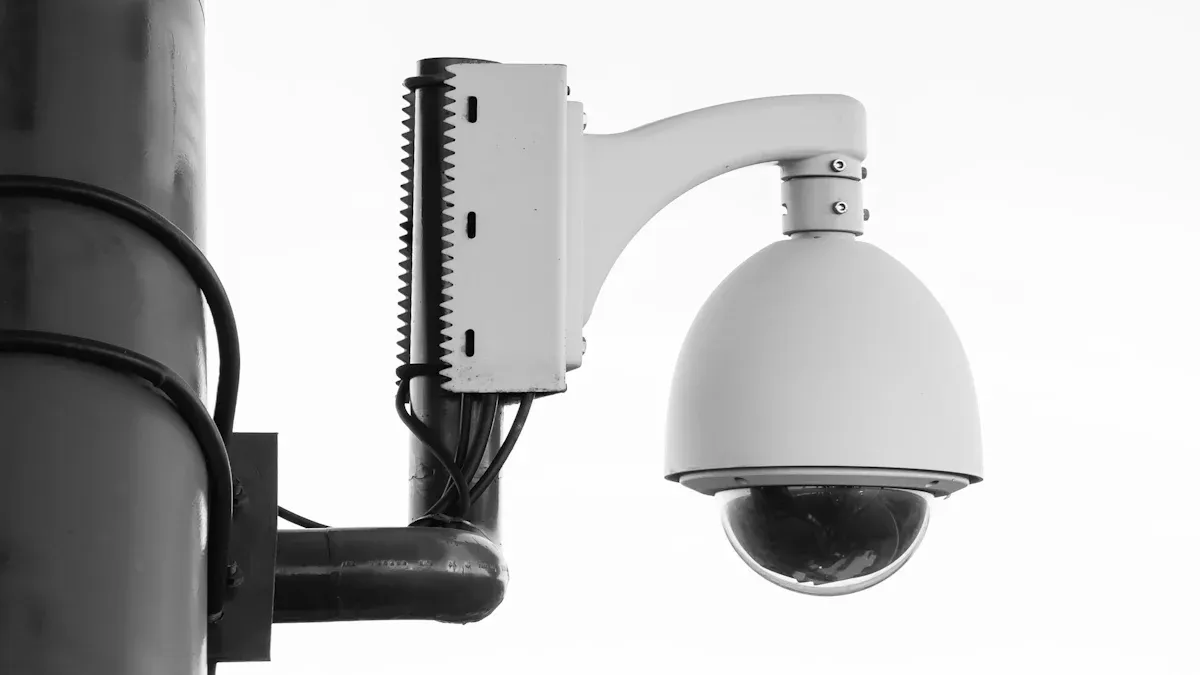
A network camera, also known as a network-camera or IP camera, allows you to watch live video from anywhere using the internet. Whether you want to monitor your home or business remotely, a network camera makes it easy. Unlike older analog cameras, a network camera sends digital video over a single cable or via Wi-Fi. This simplifies installation and lets you expand your system with additional cameras. Many modern security solutions, including wi-fi-camera setups and solar-cameras, utilize this technology for enhanced image quality and smart features.
Here’s how network cameras compare to analog models:
| Feature | Network Camera (IP) | Analog Cameras |
|---|---|---|
| Image Quality | High resolution, clear images | Lower resolution, grainy images |
| Power & Connectivity | One cable (PoE) or Wi-Fi | Separate power and video cables |
| Intelligent Features | Motion alerts, smart detection | No smart features |
Key Takeaways
- Network cameras send clear video over the internet. You can watch your home or business from anywhere. The video is high-definition and easy to see.
- They use one cable or Wi-Fi for power and data. This makes installation easier for everyone. You can add more cameras when you need them.
- Smart features like motion detection help you find real problems fast. Facial recognition can also help. These features lower the number of false alarms.
- You can save video on a local device, in the cloud, or both. This gives you safe and flexible ways to keep and watch your footage.
- Picking the right camera type and putting it in a good spot helps security. Always use strong passwords and update software to keep your system safe.
Network Camera Basics
What Is a Network Camera
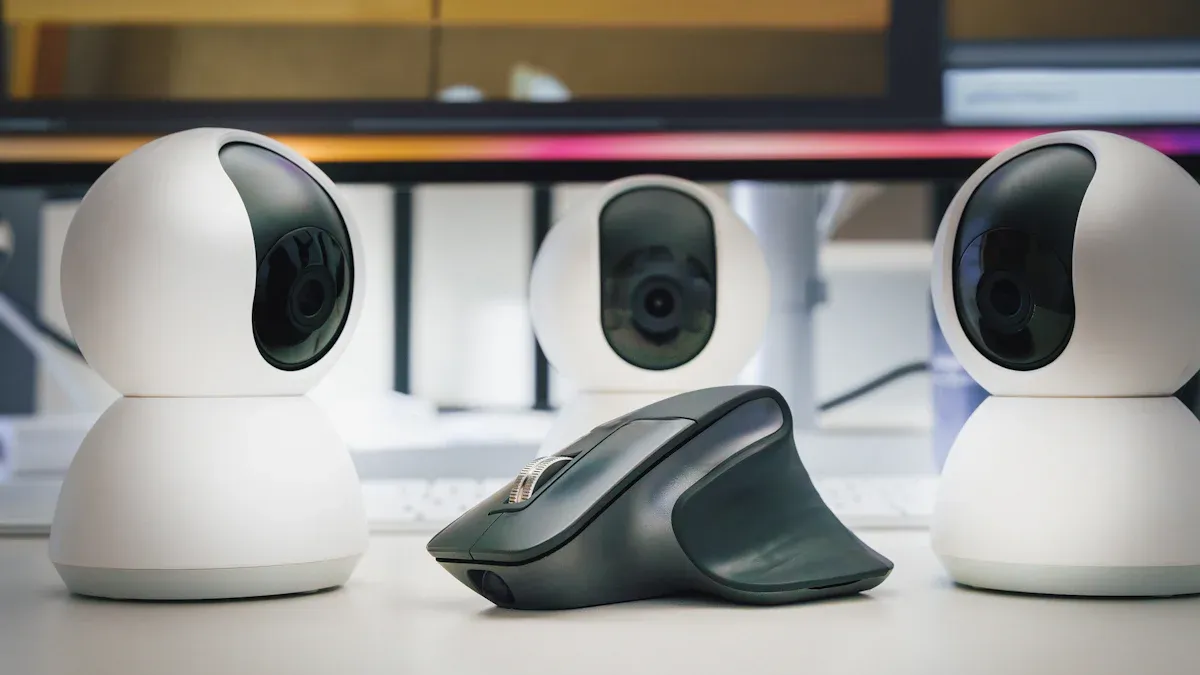
A network camera lets you watch and record video in a digital way. This camera, called an IP camera, connects right to your network. Each camera has its own IP address. This helps you find and control it from your phone or computer. The camera uses a lens and a digital sensor to capture images. It turns light into electronic signals inside the camera. The video travels over Ethernet cables or Wi-Fi. You can see the footage from anywhere.
Network cameras show high-definition video, like 1080p and 4K. You get clear and sharp images. This helps you see important things. Many brands, such as Jinan Hikwifi Camera Technology Co., Ltd, make outdoor, solar, CCTV, and indoor cameras. These cameras work with cloud storage, local storage, or both. Some cameras use Power over Ethernet (PoE). This means one cable gives power and sends data. It makes setting up the camera easier.
Tip: Network cameras often have smart features. These include motion detection and facial recognition. You can set alerts and make your security system work automatically.
| Technical Characteristic | Description |
|---|---|
| PoE Capabilities | One cable gives power and sends data. |
| Video Data Encryption | Keeps video safe from people who should not see it. |
| Camera Types | Fixed, PTZ, wireless, PoE/PoE+ for different uses. |
| Video Resolution | Shows HD and 4K for sharp images. |
| Onboard Processing | Smart tools like motion detection. |
| Storage Options | Cloud, local, or both types of storage. |
| Remote Access and Scalability | Watch video from anywhere and add more cameras easily. |
Network Camera vs. Analog
You may wonder how a network camera is different from an analog camera. Analog cameras send video as electrical signals through coaxial cables. You need a digital video recorder (DVR) to save the video. Network cameras send digital video over Ethernet or Wi-Fi. You do not need a DVR because you can use cloud or network video recorders (NVR).
Here are some main differences:
- Network cameras send video digitally over networks.
- Analog cameras use analog signals and coaxial cables.
- Network cameras can use PoE for both power and data.
- Analog cameras need two cables, one for video and one for power.
- Network cameras let you watch video from far away and in high-definition.
- Analog cameras have lower resolution and no remote viewing.
| Feature | Network (IP) Camera | Analog Camera |
|---|---|---|
| Data Transmission | Digital video over Ethernet or Wi-Fi | Analog signals over coaxial cable |
| Addressing | Each camera has its own IP address | No IP address |
| Storage | NVR or cloud storage | DVR changes analog to digital |
| Installation | PoE or wireless options | Needs two cables for video and power |
| Remote Access | Watch from anywhere | Little or no remote viewing |
| Image Quality | High-definition video | Lower resolution |
Network cameras give you more choices, better video, and easy access. You can add more cameras and watch your property from anywhere.
How Network Cameras Work
Video Capture and Processing
A network camera starts by letting light in through its lens. The CMOS image sensor changes this light into an electronic signal. This sensor works quickly and does not use much power. This helps the camera work well for a long time. Many cameras, like those from Jinan Hikwifi Camera Technology Co., Ltd, use this sensor in their outdoor, solar, and indoor models.
Inside the camera, there is a small computer called a System on Chip (SoC). The SoC has a CPU, an Image Signal Processor (ISP), and a video encoder. The ISP makes the picture look better and fixes the colors. The video encoder makes the video smaller using H.264 or H.265. This lets you send good video without using too much internet.
Tip: Many new network cameras use SoCs that help with smart features. These features include motion detection and AI-based alerts. This makes your security system smarter and more helpful.
The camera changes the picture from analog to digital in steps:
- The camera takes samples of the signal from the sensor.
- It rounds these samples to the nearest digital value.
- The camera turns these values into binary numbers for the SoC.
- The SoC makes the video smaller and gets it ready to send.
This lets your network camera send clear, digital video to your devices right away.
Network and Connectivity
You can connect your network camera with wires or wirelessly. Each way has good and bad points.
Wired connections use Ethernet cables with RJ45 connectors. These cables can give both power and data if the camera uses Power over Ethernet (PoE). Wired connections are fast and steady. They are often used in CCTV camera systems for big homes or businesses.
Wireless connections use Wi-Fi. This makes setting up the camera easier, especially where cables are hard to use. Some cameras, like solar cameras from Jinan Hikwifi Camera Technology Co., Ltd, use Wi-Fi to send video and alerts to your phone.
Here is a table to compare wired and wireless cameras:
| Aspect | Wired Cameras | Wireless Cameras |
|---|---|---|
| Installation | Needs cables through walls or ceilings; may need help. | Easy to set up without cables; good for hard-to-wire places. |
| Power & Data | PoE gives power and data with one cable. | Needs a power cord or battery; sends data over Wi-Fi. |
| Reliability | Very steady and good video quality. | Can lose signal or have problems from other devices. |
| Flexibility | Stays in one place after setup. | Easy to move if Wi-Fi is strong. |
| Security | Harder to hack because of the physical cable. | Needs strong passwords and encryption to stay safe. |
| Maintenance | Not needed often, but cables can break. | Batteries need charging or changing; solar can help. |
| Cost | Costs more at first for cables and setup. | Costs less at first; may pay more for cloud or data later. |
| Scalability | Adding cameras means more cables and work. | Easy to add more cameras if Wi-Fi can handle them. |
Note: Wired cameras are best for places where you want them to stay. Wireless cameras are good for places where you might move them.
Storage and Access
You have different ways to save video from your network camera. Each way has good and bad sides.
| Storage Option | Reliability | Cost | Key Advantages | Key Disadvantages |
|---|---|---|---|---|
| Local Storage | You control it, no internet needed, but space is small | Costs less at first, but needs care | You can see footage right away | Not much space; hardware can break |
| Cloud Storage | Very reliable, backs up video, needs good internet | You pay every month | Watch footage from anywhere | Needs fast internet; costs keep going |
| Hybrid Storage | Uses both local and cloud for backup | Costs more at first | Less chance of losing data | Setup is more complex |
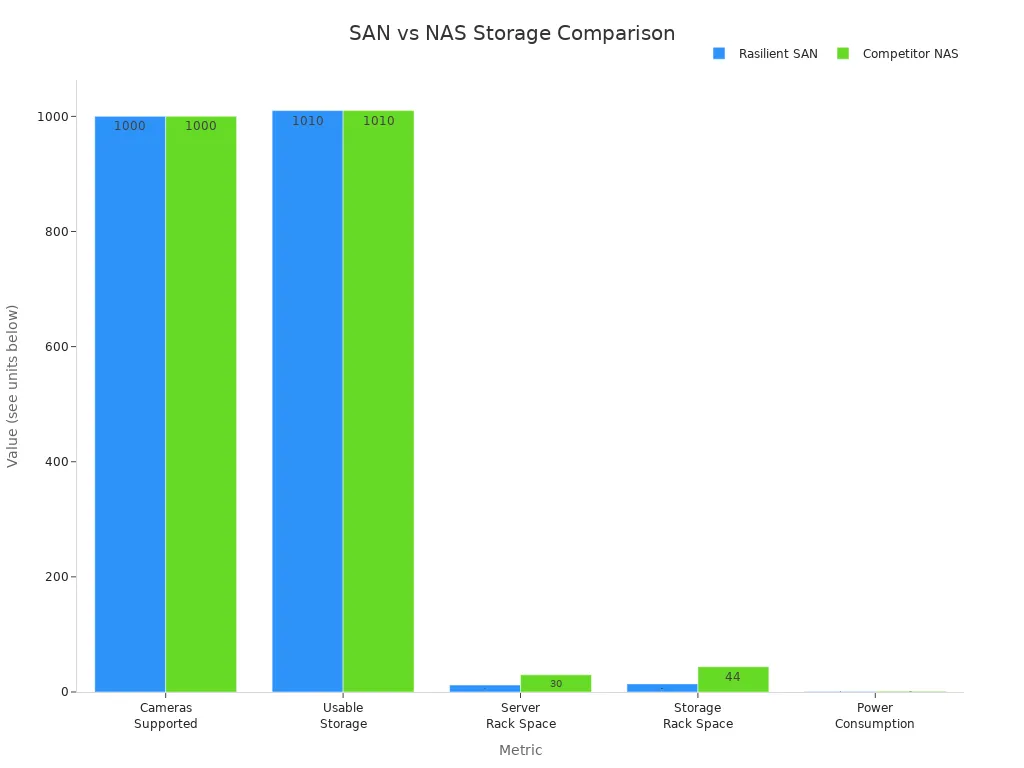
Big businesses might use SAN (Storage Area Network) or NAS (Network Attached Storage). SAN is very reliable and can handle many cameras, but it costs more and needs experts. NAS is easier and cheaper for small businesses but cannot handle as many cameras.
You can also use SD cards inside the camera to save video. This works well for indoor cameras or places with only a few cameras.
Remote access lets you watch live or saved video from your phone or computer. Most network cameras have a safe web page or app for this. To keep your video safe, cameras use encrypted video and secure cloud storage. You should update your camera’s software often and use strong passwords. Some systems let you choose who can see or manage the cameras, which adds more safety.
Tip: Jinan Hikwifi Camera Technology Co., Ltd has cameras that work with cloud, local, and hybrid storage. This gives you more choices for your security.
Benefits for Security
High Resolution
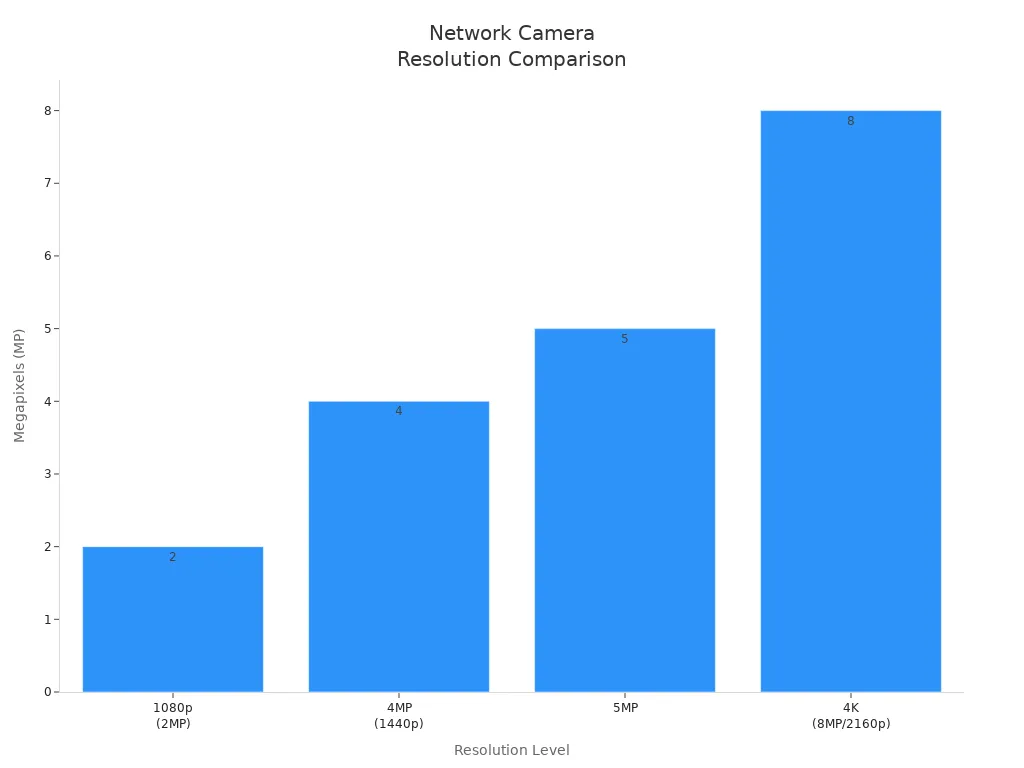
High-resolution cameras give you clearer pictures. Most cameras today can show 720p, 1080p, or even 4K video. 4K video shows tiny details, like faces and license plates. This is very helpful for big outdoor spaces. If you pick a 1080p or 4MP camera, you get good pictures and save storage space. Jinan Hikwifi Camera Technology Co., Ltd has both indoor and outdoor cameras with these choices. The chart below shows how the resolutions compare:
Tip: High-resolution cameras help you see important details and collect better proof.
Remote Monitoring
You can check your property from any place. Remote monitoring lets you watch live video on your phone or computer. This keeps your home or business safe all day and night. You can see many places at the same time. This helps you notice problems faster. You can act quickly if there is an alarm and share video with the police. Remote monitoring also helps you find camera problems fast and keep them working. Many solar cameras from Jinan Hikwifi Camera Technology Co., Ltd let you use remote access, even in far away spots.
- You get alerts right away if something strange happens.
- You do not need as many security guards, so you save money.
- You help keep workers and people safe.
Scalability
You can make your security system bigger when you need to. It is easy to add more cameras because they use your local network. Power over Ethernet (PoE) lets one cable give power and send data. This makes setting up cameras simple. Network video recorders (NVRs) help you control lots of cameras together. You can use your phone or computer to manage everything. Jinan Hikwifi Camera Technology Co., Ltd has CCTV cameras that work well in big systems.
| Feature | Benefit |
|---|---|
| Local Network | Add cameras easily without big changes |
| PoE | One cable for power and data |
| Remote Access | Control many cameras from anywhere |
| NVR Compatibility | Record and manage all cameras together |
| Smart Features | Pay attention to important things |
Note: You can add new cameras or upgrade your system without starting over.
Smart Features
You get more than just video with smart features. These features make your security system better and easier to use. Cameras can spot motion, see faces, and follow moving things. Some cameras count people or cars. You get alerts if something odd happens. Jinan Hikwifi Camera Technology Co., Ltd puts these features in their indoor and outdoor cameras.
- Motion detection
- Facial recognition
- License plate reading
- Intrusion and tripwire alerts
- People counting
- Remote notifications
Smart features help you notice real problems and stop false alarms. You spend less time watching video and more time fixing real issues.
Types of Network Cameras

Network cameras come in many shapes and sizes. Each kind is good for a different job. You can pick the one that fits your home or business best. Here are some common types you might see:
Dome
Dome cameras are round and not easy to notice. You often see them on ceilings in stores or offices. The dome cover keeps the camera safe from damage and bad weather. People cannot tell where the camera is looking. This helps stop people from messing with it. Dome cameras can see a wide area. You can use them inside or outside. Many models, like the Indoor Camera from Jinan Hikwifi Camera Technology Co., Ltd, use this shape for busy places.
Tip: Dome cameras are good for doors, hallways, and big rooms. Their hard shell keeps them safe from being broken.
Bullet
Bullet cameras look like small tubes or pipes. You can see them on walls or near gates. These cameras are easy to spot and warn people not to do bad things. Bullet cameras have strong lenses and can see at night with infrared LEDs. They are best for watching parking lots, fences, or driveways. Jinan Hikwifi Camera Technology Co., Ltd has Outdoor Cameras and Solar Cameras in bullet style for strong outdoor safety.
| Camera Type | Key Features | Best Use |
|---|---|---|
| Dome | Wide view, hard to break | Indoors, entrances |
| Bullet | Sees far, easy to see, tough | Outdoors, edges |
PTZ
PTZ means Pan, Tilt, and Zoom. You can move these cameras from far away. They can follow people or cars as they move. PTZ cameras can look at big spaces and zoom in close. You use a joystick or software to control them. These cameras help you watch moving things right when it happens. Jinan Hikwifi Camera Technology Co., Ltd has PTZ cameras for big places like warehouses or parking lots.
Note: PTZ cameras are great when you need to look in many directions with just one camera.
Specialty
Specialty cameras do special jobs. Some, like pinhole cameras, are small and easy to hide. Others, like thermal cameras, can see in the dark or through smoke. You might use these for ATMs, teller desks, or doors. Jinan Hikwifi Camera Technology Co., Ltd also has specialty cameras for special security needs.
You can choose the camera type that works best for your space. Each kind gives you different ways to keep your property safe.
Choosing and Installing
Assessing Needs
First, think about what you want your security system to do. Walk around your property and see which spots need watching. Make a list of places like doors, parking lots, or hallways. Decide if you need to see at night, zoom in, or watch wide areas. Outdoor spaces need cameras that can handle rain, dust, and sun. Indoor spaces need smaller cameras that are easy to hide. Jinan Hikwifi Camera Technology Co., Ltd has Outdoor Cameras, Solar Cameras, CCTV Cameras, and Indoor Cameras for different needs.
Here is a table to help you compare important factors:
| Factor Category | Key Considerations |
|---|---|
| Camera Features | Wide/narrow view, night vision, high resolution, PTZ, AI analytics, thermal imaging |
| Installation & Site Survey | Site assessment, camera positioning, connectivity, infrastructure |
| Integration | Connection with alarms, access control, scalability |
| Data Storage | DVR, NVR, NAS, cloud storage; cost, capacity, security |
| Remote Monitoring | Mobile apps, cloud access |
| Cost Considerations | Initial cost, maintenance, energy, software updates |
| Professional Support | Licensed installers, warranty, training, customer service |
| Future-Proofing | Expansion, compatibility with new technology |
Tip: Outdoor cameras need to be tough and see well at night. Indoor cameras work best in rooms with good air and temperature.
Network Setup
Each Network Camera must connect to your network. Wired cameras use Ethernet cables and PoE switches for power and data. Wireless cameras use your Wi-Fi to connect. Plan where each camera will go and label them. Connect the NVR to your router or PoE switch. Give each camera its own IP address. You can use your router’s DHCP or set a static IP in the camera’s web page. Make sure no two devices have the same IP address. Test each camera to see if it records and streams video.
Steps for setup:
- Pick camera spots and label the wires.
- Connect cameras to PoE switch or Wi-Fi.
- Give each camera a static IP address.
- Connect NVR to router or switch.
- Test if cameras work and can be seen from far away.
Note: Jinan Hikwifi Camera Technology Co., Ltd cameras are easy to set up with PoE and Wi-Fi.
Security Tips
You need to keep your cameras safe from hackers. Use strong and different passwords for every camera. Change the default password as soon as you can. Update camera software often or turn on auto-updates. Put cameras on their own network or VLAN to protect your main network. Encrypt all video and data with SSL/TLS. Do not use port forwarding unless you must. Lock up equipment rooms and cables so no one can mess with them.
| Security Aspect | Vulnerability Description | Best Practice |
|---|---|---|
| Camera Passwords | Weak or default passwords allow easy access | Use strong, unique passwords; change regularly |
| Encryption | Unencrypted video can be intercepted | Use SSL/TLS for all connections |
| Firmware Updates | Old software has security holes | Enable auto-updates; check monthly |
| Network Topology | Cameras on main network create risks | Use VLANs or separate networks |
| Physical Security | Equipment can be stolen or damaged | Lock rooms, secure cables |
Tip: Always check the law before putting up cameras. Do not point cameras at private places.
Installation
Put cameras where they can see clearly and get a strong signal. Outdoor cameras should be high up, above lights, and hard to reach. Indoor cameras work best about seven feet high in busy spots. Clean the lenses often and check if the picture is clear. Test night vision and motion alerts. If you have problems, ask an expert for help. Jinan Hikwifi Camera Technology Co., Ltd gives help and training for their cameras.
Some problems are blurry pictures, weak signals, and bad night vision. You can fix these by cleaning lenses, moving the camera, or updating software. Do not point cameras at neighbors or private spots.
Note: Good setup and regular checks help your security system last a long time.
You get better security with digital connections and remote viewing. Smart features help you watch your property from anywhere. High-definition video and AI detection make things safer. Cloud storage lets you save video and check it later. Network cameras show clearer images than analog systems. They also keep your video safe with encryption. You can set them up in many ways. Think about what you need and pick the right camera for each spot. Always follow local rules about cameras. If you need help, look at guides from trusted brands like Jinan Hikwifi Camera Technology Co., Ltd or other top security companies.
FAQ
How do you access video from a network camera?
You can watch video with an app or web browser. Most cameras let you log in on your phone or computer. You can see live or saved video from anywhere.
Can you use network cameras outdoors?
Yes, you can use outdoor cameras outside. Jinan Hikwifi Camera Technology Co., Ltd has Outdoor Cameras and Solar Cameras. These cameras work in rain, sun, and dust. You get clear video during the day and at night.
What storage options do you have for network cameras?
You can pick local storage, cloud storage, or both.
You can save video on SD cards, NVRs, or cloud services. Jinan Hikwifi Camera Technology Co., Ltd cameras work with all these choices.
How do you keep your network camera secure?
- Change the default password right away.
- Update the camera software often.
- Use encrypted connections for safety.
These steps help keep your video safe from hackers.
Do network cameras work without internet?
Some cameras, like CCTV Cameras from Jinan Hikwifi Camera Technology Co., Ltd, save video on their own. You do not need internet to watch or record locally. You need internet for remote viewing and cloud storage.