
You want the best outdoor security, so you should know how Solar Security Cameras and 4G security cameras are different. Solar Security Cameras get power from sunlight. This makes them good for places without electricity nearby. 4G cameras use mobile networks to connect. You do not need Wi-Fi for them. > When you pick a camera, think about how it connects, how easy it is to set up, how much it costs, if it works well outside, and if it fits your area.
Key Takeaways
- Solar security cameras get power from sunlight. They connect to Wi-Fi. These cameras work best in sunny places with strong Wi-Fi. They do not cost much to run.
- 4G security cameras use mobile networks and a SIM card. They can work in faraway places without Wi-Fi. You need a data plan for them. They might cost more than solar cameras.
- Both types of cameras can handle bad weather. You can set them up easily without wires. Solar cameras need lots of sunlight. 4G cameras need a strong mobile signal.
- Pick solar cameras for cities or suburbs with good Wi-Fi and sun. This helps you save money. Choose 4G cameras with solar power for country or off-grid places. They give good coverage there.
- Think about where you live, your network, your budget, and how much care the camera needs. This will help you pick the best camera to keep your outdoor area safe.
Solar Security Cameras

How They Work
Solar Security Cameras get power from the sun. You do not need to plug them in. Each camera has a solar panel. The panel collects sunlight during the day. It stores energy in a battery. The camera uses this battery at night or when it is cloudy. You can put these cameras where there is no electricity. Most cameras connect to Wi-Fi. You can watch live video on your phone or computer. Some cameras have motion sensors. When they see movement, they start recording. They also send you an alert. This helps you watch your property all the time.
Tip: Put the solar panel where it gets lots of sun. This helps the camera work longer without losing power.
Outdoor Uses
You can use Solar Security Cameras in many outdoor places. They are good for spots where wires are hard to use. Here are some places where people use these cameras:
- Construction sites that need security for a short time
- Parking lots that are very big
- Remote places with no power lines
- Farms, ranches, or big gardens
- Outdoor events or festivals that move around
These cameras can handle bad weather. They work in heavy rain or strong sun. Their design makes them good for outdoor use. You can move them if you need to. This makes Solar Security Cameras a smart choice for many outdoor needs.
4G Security Cameras
How They Work
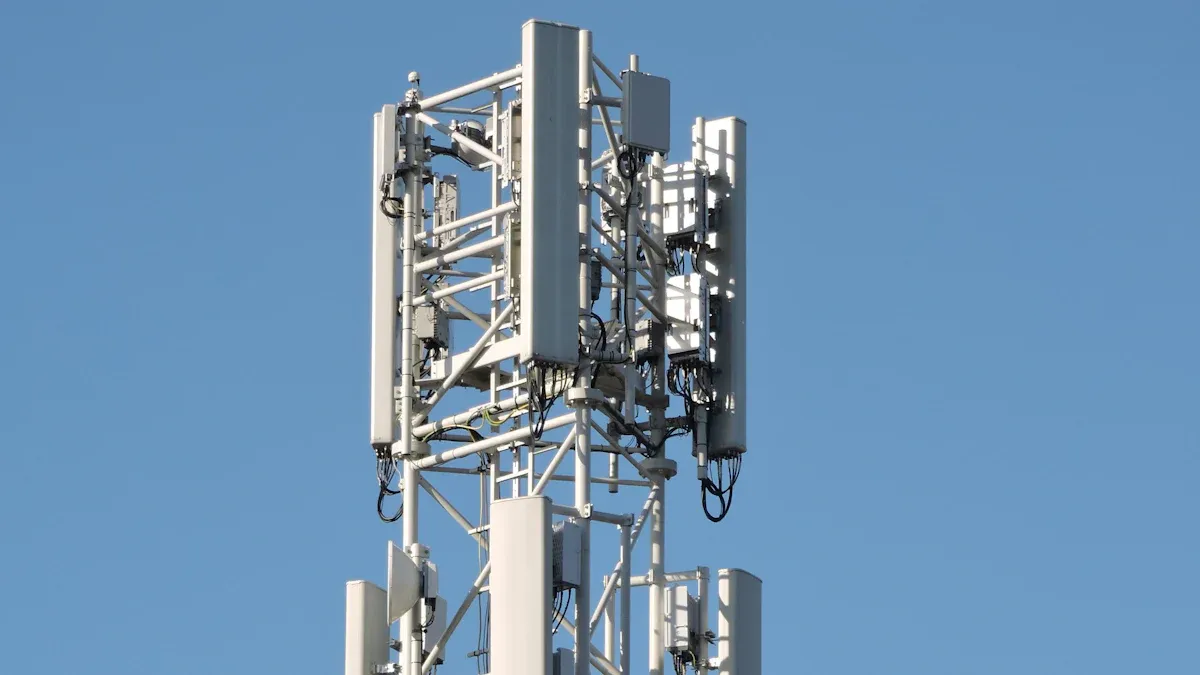
4G security cameras use mobile networks to send video and alerts to your phone. You do not need Wi-Fi or a wired internet connection. You only need a SIM card with a data plan. The camera connects to the 4G network, just like your smartphone. This lets you watch live video or get alerts from almost anywhere.
You power these cameras with a battery, a solar panel, or a power adapter. Some models use solar panels for longer use in remote places. You can set up the camera using a mobile app. The app helps you scan a QR code or enter a device ID to connect the camera to your account.
Tip: Always check if your SIM card works with the camera and if your area has good 4G coverage.
To install a 4G security camera outdoors, you should:
- Make sure the camera has power from a battery or AC outlet.
- Insert a SIM card with an active data plan.
- Pick a strong spot to mount the camera, like a wall, ceiling, or tree.
- Use tools like a drill and screwdriver to secure the camera.
- Turn on the camera and finish setup in the app.
- If you have problems, check the power, SIM card, and network, or reset the camera.
Outdoor Uses
You can use 4G security cameras in many outdoor places. These cameras work well where Wi-Fi is weak or missing. People often use them for:
- Homes and yards, especially in large properties
- Above-ground pools for extra safety
- Remote farms, ranches, or cabins
- Construction sites without power or internet
- Businesses in rural or off-grid areas
Some 4G cameras, like the Vosker V300, use solar panels and large batteries. They can run for months without outside power. This makes them perfect for long-term outdoor use.
Data usage depends on how you use the camera. If you only check live video sometimes, you use less data. If you stream video all day, you use much more. Here is a table to help you understand:
| Usage Scenario | Bitrate | Daily Data Usage | Estimated Monthly Data Usage (30 days) |
|---|---|---|---|
| Hibernate/Sleep Mode | ~0 Mbps | ~5 MB per day | ~150 MB (0.15 GB) |
| Occasional Live Streaming (1 hr) | 1 Mbps | 0.25 GB – 0.45 GB per day | 7.5 GB – 13.5 GB |
| Continuous Live Streaming (24 hrs) | 1 Mbps | 5 GB – 10.5 GB per day | 150 GB – 315 GB |
| Playback from microSD (1 hr) | 2 Mbps | 0.5 GB – 0.9 GB per day | 15 GB – 27 GB |
| Playback from microSD (24 hrs) | 2 Mbps | 10 GB – 21 GB per day | 300 GB – 630 GB |
| Cloud Storage (1 hr) | 1 Mbps | 0.25 GB – 0.45 GB per day | 7.5 GB – 13.5 GB |
| Cloud Storage (24 hrs) | 1 Mbps | 5 GB – 10.5 GB per day | 150 GB – 315 GB |
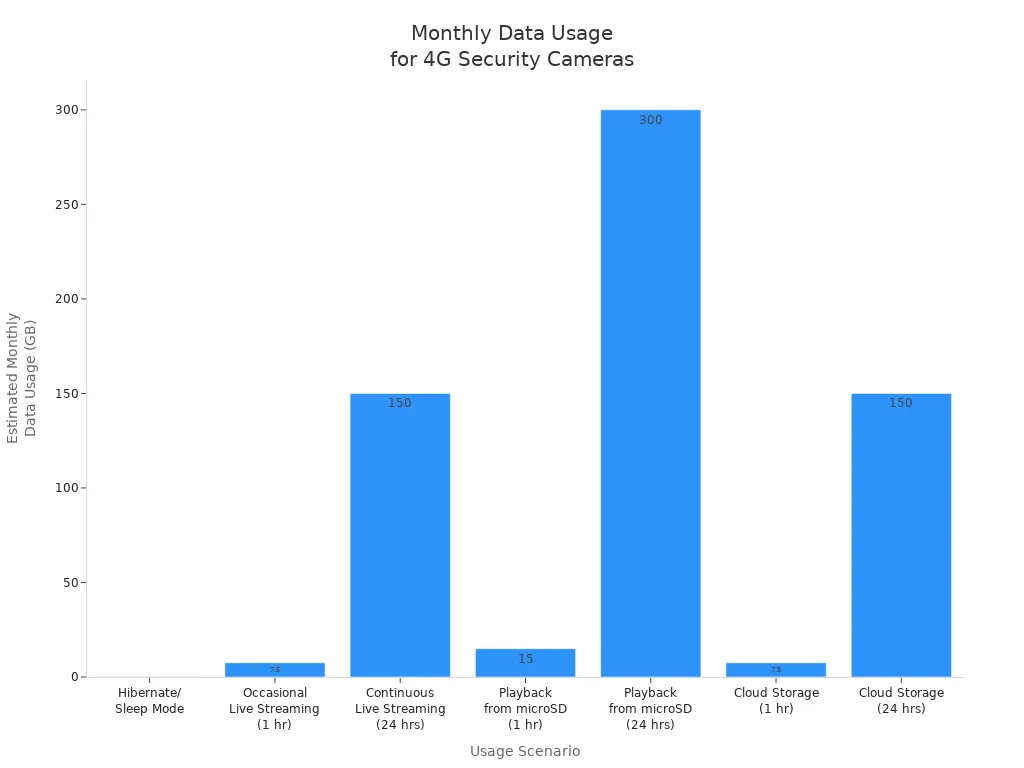
Note: Occasional live viewing uses about 7.5 to 13.5 GB per month, but continuous streaming can use over 300 GB. Always choose a data plan that fits your needs.
Key Differences
Connectivity
Think about how your camera connects to the internet. Most solar security cameras use Wi-Fi. This works if you have strong Wi-Fi outside. In cities, Wi-Fi is usually good. You can watch video and get alerts on your phone.
4G security cameras use mobile networks, not Wi-Fi. You only need a SIM card and data plan. This is great for places with weak or no Wi-Fi. In rural areas, Wi-Fi may not work well. Wired cameras can have problems with dead zones and weather. With a 4G camera, you get:
- Video sent over mobile networks
- No need for Wi-Fi or broadband
- You can put it anywhere with a mobile signal
- Fewer problems from weather or power loss
If you want a strong connection in faraway places, pick a 4G camera with solar power. This lets you watch your property even off the grid.
Power Source
You also need to think about how your camera gets power. Solar security cameras use sunlight. Each one has a solar panel that charges a battery. The battery keeps the camera working at night or when it is cloudy. You do not need wires or an outlet.
4G security cameras can use different power sources. Some use batteries, some use solar panels, and some plug into the wall. If you choose a 4G camera with a solar panel, it can work for a long time without help. The battery helps the camera work when there is no sun.
Solar panels and batteries make both types good for outside, especially where there are no power lines.
Installation
You want a camera that is easy to set up. Solar security cameras are simple to install. You mount the camera and solar panel, connect to Wi-Fi, and start watching. You do not need to dig or run wires. This saves you time and money.
4G security cameras are also easy to install. You put in a SIM card, mount the camera, and connect it to your app. You do not need Wi-Fi or cables. This makes 4G cameras good for places where you cannot run wires or for short-term use.
- Both types let you move the camera if you need to.
- 4G cameras with solar panels are very flexible for big or faraway places.
Use Cases
Pick the camera that fits your needs. Solar security cameras work best where there is lots of sun and strong Wi-Fi. They are good for city homes, gardens, parking lots, and building sites with Wi-Fi.
4G security cameras are best for faraway or country places. You can use them for:
- Watching animals in forests or fields
- Boats and docks where wires are hard to use
- RVs and campsites with no Wi-Fi
- Barns, ranches, and farms to keep animals and tools safe
These cameras do not need Wi-Fi or power lines. You get wireless security for a long time with little work. If you need to watch a place far from your home or office, a 4G camera with solar power is often best.
4G solar cameras are great for faraway places with no Wi-Fi or power. Wi-Fi solar cameras cost less where Wi-Fi is strong.
Solar Security Cameras: Pros and Cons
Advantages
When you pick Solar Security Cameras for outside, you get lots of good things. Here are some of the main reasons people like them:
- 🌞 Eco-friendly power: These cameras use sunlight for energy. This helps the planet by making less pollution and fewer greenhouse gases.
- 💸 Cost savings: You do not pay for electricity to use your camera. You also save money because you do not need new batteries often.
- 🏕️ Works anywhere: You can use these cameras in faraway or country places. They do not need to be plugged in, so they are great for spots with no steady power.
- 🔒 Smart features: Many cameras connect wirelessly and work with smart homes. Some have AI motion detection and better night vision to help you see in the dark.
- ☔ Weatherproof design: Most Solar Security Cameras have a strong IP66 rating. This means they can handle rain, dust, and tough weather outside.
- 🛠️ Easy setup: You do not need to run wires. You can put up the camera fast, which is helpful for many people.
- 🔋 Reliable performance: These cameras work well even when there is not much sun. You can count on them to keep working.
- 💾 Flexible storage: You can save your videos in the cloud or on a TF card to keep them safe.
Tip: Put your camera where it gets lots of sun for the best results.
Disadvantages
There are also some problems with Solar Security Cameras you should know:
- ☁️ Battery charging issues: If the battery runs out and the solar panel does not get enough sun, your camera might stop or not work right.
- 📶 Connection problems: These cameras need Wi-Fi or 4G LTE. If your signal is weak or there is something blocking it, you may have trouble watching video or getting alerts.
Note: Always make sure your spot has good sunlight and a strong network before you set up your camera.
4G Security Cameras: Pros and Cons
Advantages
4G security cameras have many good points for outside use. You do not need Wi-Fi or wires. This makes them great for places where Wi-Fi does not work.
- 📶 Flexible Connectivity: You just need a SIM card and data plan. The camera uses the 4G network like your phone. You can put it anywhere with a mobile signal.
- 🔋 Multiple Power Options: These cameras can use batteries, solar panels, or plug in. You have more ways to power them in different places.
- 🛠️ Easy Installation: You do not need to run wires or cables. You can set up the camera fast and move it if you want to watch a new spot.
- 🚚 Great for Temporary Use: These cameras are good for short jobs, like at building sites or events. When you are done, you can take them down and use them somewhere else.
- 🌲 Works in Remote Locations: Farms, cabins, and campsites may not have Wi-Fi. A 4G camera lets you watch your property from far away.
Tip: Check your mobile signal before you put up a 4G camera. A strong signal gives you better video and faster alerts.
Disadvantages
There are some things about 4G security cameras you should know. These cameras may not work for everyone.
- 💰 Ongoing Data Costs: You have to pay for a data plan each month. If you watch a lot of video, your bill can get high.
- 📶 Signal Problems: If your area has weak 4G, the camera may not work well. You could miss alerts or lose video.
- 🔋 Battery Life: If you only use batteries, you must check and charge them often. Solar panels help, but cloudy days can still cause problems.
- 🛑 Limited Features: Some 4G cameras do not have things like high-definition video or smart home features.
- 🏷️ Higher Upfront Price: 4G cameras usually cost more than Wi-Fi ones. You pay extra for more ways to use them.
Note: Think about where you live and how much video you want to watch before you pick a 4G camera. This helps you avoid extra costs and problems.
Cost Comparison
Upfront Costs
When you shop for outdoor security cameras, you will notice a difference in the price tags. Solar security cameras usually cost less at first. Most basic models start at about $80 to $200. These cameras come with a solar panel and a battery. You do not need to buy extra wires or pay for professional installation.
4G security cameras often cost more. You pay for the camera, the 4G module, and sometimes a solar panel. Prices for 4G cameras usually start at $150 and can go up to $400 or more. If you want a camera with both 4G and solar power, expect to pay at the higher end.
| Camera Type | Typical Price Range | Extra Equipment Needed? |
|---|---|---|
| Solar (Wi-Fi) | $80 – $200 | No |
| 4G (Battery Only) | $150 – $350 | SIM card |
| 4G (with Solar) | $200 – $400+ | SIM card |
Tip: Always check if the camera kit includes a solar panel and mounting hardware. Some brands sell these parts separately.
Ongoing Costs
You should also think about the money you will spend after you buy the camera. Solar security cameras have very low ongoing costs. Sunlight powers the camera, so you do not pay for electricity. If you use cloud storage, you might pay a small monthly fee, but you can also use a memory card for free storage.
4G security cameras need a data plan. You must pay for mobile data every month. The cost depends on how much video you stream or store in the cloud. Most plans start at $5 to $20 per month. If you use the camera a lot, your data bill can go higher. You may also pay for cloud storage.
- Solar Camera Ongoing Costs:
- Free power from the sun
- Optional cloud storage ($3–$10/month)
- 4G Camera Ongoing Costs:
- Data plan ($5–$20/month or more)
- Optional cloud storage ($3–$10/month)
Note: If you want to save money over time, solar cameras with Wi-Fi cost less to run. 4G cameras give you more freedom, but you pay more each month.
Reliability Outdoors
Weather Resistance
Outdoor security cameras face tough weather. You want your camera to work in rain, snow, heat, and dust. Most solar and 4G security cameras have strong weatherproof ratings. Look for cameras with an IP65 or IP66 rating. This means the camera can handle heavy rain and dust.
- Solar security cameras often have sealed cases. Water and dirt cannot get inside. You can use them in hot summers or cold winters.
- 4G security cameras also come with weatherproof designs. Many models work in temperatures from -4°F to 122°F.
Tip: Always check the camera’s weather rating before you buy. Place the camera under a roof or shade if you want extra protection.
Here is a quick table to help you compare:
| Camera Type | Typical Weather Rating | Temperature Range |
|---|---|---|
| Solar (Wi-Fi) | IP65/IP66 | -4°F to 122°F |
| 4G (with Solar) | IP65/IP66 | -4°F to 122°F |
Power and Connectivity
You need your camera to stay on day and night. Solar security cameras use sunlight to charge their batteries. If you get many cloudy days, the battery may run low. Place the solar panel where it gets the most sun. Some cameras let you add extra batteries for longer use.
4G security cameras need power too. Many use solar panels and batteries, just like solar cameras. If you use only batteries, you must check and charge them often. A solar panel helps the camera work longer without help.
- Solar cameras need strong Wi-Fi to send video and alerts.
- 4G cameras use mobile networks. You need a good 4G signal for the camera to work well.
Note: Test your Wi-Fi or 4G signal before you install the camera. A weak signal can cause missed alerts or lost video.
Both camera types can work well outdoors if you set them up right. Choose the best spot for sun and signal. This helps your camera stay reliable in any weather.
Choosing the Right Camera
Location
Start by thinking about where you want to place your camera. If you need to watch a remote field, a cabin, or a place without power lines, you should look at cameras that do not need wires. 4G security cameras work well in these spots because they use mobile networks. You can also use Solar Security Cameras in open areas with lots of sunlight. In cities or suburbs, you may have strong Wi-Fi and easy access to power. Here, a Wi-Fi solar camera can save you money and give you steady coverage.
Network Availability
Network strength changes how well your camera works. You need to match your camera to the network at your location. The table below shows how network type affects each camera:
| Aspect | 4G Security Cameras | Solar Security Cameras (Wi-Fi) |
|---|---|---|
| Network Dependency | Needs strong cellular signal for remote access. | Needs stable Wi-Fi for remote access. |
| Placement Flexibility | High; works in off-grid places with cell coverage. | Limited; needs Wi-Fi at the site. |
| Reliability Factors | Weak signal or network congestion can cause problems. | Wi-Fi outages stop remote viewing, but local recording may continue. |
If you have good cell coverage but no Wi-Fi, pick a 4G camera. If you have strong Wi-Fi, a solar-powered Wi-Fi camera is a smart choice.
Budget
Think about how much you want to spend now and later. 4G cameras cost more at first and need a monthly data plan. Solar Security Cameras with Wi-Fi cost less to buy and run. You do not pay for data, only for cloud storage if you want it. Make a list of your needs and compare prices before you buy.
Tip: If you want to save money, use a Wi-Fi solar camera where you have good Wi-Fi.
Maintenance
You want a camera that is easy to care for. Solar Security Cameras need sunlight to charge. Clean the solar panel often to keep it working well. 4G cameras with batteries need you to check battery life and data usage. Both types need you to check for software updates and clean the lens. Pick a camera that matches how much time you want to spend on upkeep.
Remember: The best camera fits your location, network, budget, and how much work you want to do.
Recommendations
Rural and Remote
Some people live or work far from cities. These places often have weak Wi-Fi and no easy power. You need a camera that does not need wires or internet. A 4G security camera with a solar panel is a good choice. You only need a strong mobile signal and sunlight. You can watch your property from anywhere on your phone. This setup is great for farms, cabins, and big fields. You do not need to run cables or find an outlet. You can feel safe even in faraway places.
Key Points for Rural and Remote Areas:
- Pick a 4G camera with solar power for full freedom.
- Check your mobile signal before putting up the camera.
- Put the solar panel where it gets the most sun.
- Use the camera to watch animals, tools, or gates.
Tip: Test your camera’s signal and battery before leaving it in a far spot.
Urban and Suburban
Some people live in cities or busy neighborhoods with strong Wi-Fi. Here, you can use a Wi-Fi security camera with a solar panel. This choice costs less and gives steady coverage. You do not pay for a data plan. You can connect the camera to your home Wi-Fi and watch live video on your phone. These cameras are good for homes, gardens, driveways, and parking lots. You can also use them for small stores or shops.
Best Practices for Urban and Suburban Areas:
- Use a Wi-Fi camera with a solar panel to save money.
- Place the camera so it can see your door, yard, or driveway.
- Make sure your Wi-Fi is strong where the camera is.
- Clean the solar panel often for best results.
Note: If your Wi-Fi is weak outside, use a Wi-Fi extender to make it stronger.
Temporary Setups
Sometimes you need security for a short time. Construction sites, festivals, and events need cameras you can move and set up fast. Mobile surveillance trailers and quick pole cameras are good for these jobs. Companies like WCCTV have solar-powered units that use 4G LTE. You can set up these cameras in minutes. You do not need power or internet at the site. These systems record video and send live footage to your phone or computer.
You can use these cameras for crowd control, safety, and stopping crime. Some units have lights and speakers to warn people or alert staff. You can move the cameras to new places as needed. The City of McKinney used solar trailers at Oktoberfest to keep people safe and use fewer workers.
Benefits of Mobile Surveillance for Temporary Setups:
- Fast and easy to set up
- No need for wires, power, or internet
- Many power choices: solar, battery, or plug in
- Watch from far away with free software
- Good for events, building sites, and public safety
Tip: Choose a mobile camera system if you need quick, flexible security for a short job.
If you have good Wi-Fi and lots of sun, pick a solar security camera. If you are in a faraway place with no Wi-Fi or power, use a 4G security camera.
Pros:
- Solar cameras help you save money and use clean energy.
- 4G cameras can work almost anywhere with a mobile signal.
Cons:
- Solar cameras need both sunlight and Wi-Fi to work.
- 4G cameras cost more money and need a data plan.
Think about where you live, your network, and your budget before you choose. The right camera will help keep your property safe.
FAQ
Can you use a solar security camera without Wi-Fi?
You need Wi-Fi for most solar security cameras. Some models use 4G instead. If you do not have Wi-Fi, choose a 4G solar camera. This type uses a SIM card and mobile data.
How long does a solar security camera battery last?
Most solar camera batteries last 1 to 6 months on a full charge. Sunlight keeps the battery charged. Cloudy days or heavy use may lower battery life. Check your camera’s battery level often.
Do 4G security cameras work in all locations?
4G cameras need a strong mobile signal. If your area has weak cell coverage, the camera may not work well. Always test your signal before installing the camera.
What happens if there is no sun for several days?
The camera uses its battery when there is no sun. If the battery runs out, the camera stops working. Place your solar panel where it gets the most sunlight for best results.
Can you view footage from these cameras on your phone?
Yes, you can watch live video and get alerts on your phone. Use the camera’s app to see footage from anywhere. Make sure your camera has a good network connection.